Resources and learning
 When you collect, hold or use a learner’s personal information you must keep it safe and secure.
On this page:
Download a PDF of the guidance on this page (PDF, 623KB).
Keeping information safe and secure helps you build trust and confidence in the way you manage your learner’s personal information and protects your learner’s privacy, wellbeing and safety.
Keeping learner information safe and secure isn’t a ‘one and done’ or ‘one size fits all’ thing. What might be a reasonable security safeguard for some information, may not be a reasonable safeguard for other information (e.g. health information may require additional safeguards due to its sensitivity). As technology evolves, so too must your security safeguards. Keeping learner information safe and secure should always be viewed through the lens of continuous monitoring and improvement.
Relevant information privacy principles
The Privacy Act 2020 sets rules about what an education provider must do to keep learners’ personal information safe and secure.
The relevant information privacy principle (IPP) is:
Principle 5: Storage and security of personal information
When holding personal information an education provider must ensure that the information is protected, by such security safeguards as are reasonable in the circumstances to take, against:
- loss
- unauthorised access, use, modification or disclosure
- other misuse.
If you are providing information to another person so they can provide a service to your organisation, you must do everything you reasonably can to prevent unauthorised use or disclosure of that information.
What are reasonable security safeguards?
To meet the requirements of IPP 5 you need to make sure you have reasonable security safeguards in place to protect your learners’ personal information. Whether a security safeguard is reasonable will depend on the circumstances, but it should be practicable and actually protect your learners’ data.
To help identify and implement appropriate security safeguards it helps to know:
- what learner information you hold and where it is stored
- what learner information is considered more sensitive in nature
- who needs to access learner information and for what purposes.
When deciding whether a safeguard is reasonable in the circumstances ask yourself: Could someone who shouldn’t know this information see it, access it or hear it?
If the answer is yes, then the safeguards you have in place to protect the information may not be sufficient to keep the learner’s information safe and secure.
Who is responsible for keeping learner information safe and secure?
Keeping information safe and secure is everyone’s responsibility:
The governance function (e.g. school boards and ECE service owners) is responsible for making sure the appropriate information security policies and processes are in place to keep learner information safe and secure. The governance function is also responsible for making sure those policies are reviewed regularly and that staff receive appropriate training.
School principals and ECE service managers are responsible for making sure information security policies and processes are implemented and followed by staff, contractors, visitors and learners. School principals and ECE service managers will also be responsible for managing any information security breaches or complaints that may arise.
Staff are responsible for following information security policies and processes to make sure they are keeping learner’s personal information safe and secure, including reporting any information security and privacy near misses or breaches.
Back to top.
Develop and implement an information security policy
A good starting point for keeping learner information safe and secure is to develop and then implement an information security policy.
|
Just having an information security policy isn’t enough to keep your learner’s personal information safe. You need to implement the safeguards set out in your policy and then test that they are working. On-going monitoring of your safeguards makes sure they remain effective.
|
An information security policy is a set of guidelines and rules that set out how learner information will be kept safe and secure. An information security policy should cover all formats of personal information (e.g. paper records and digital records including images, videos and audio recordings) and apply to all staff, learners, contractors and visitors. It should also include the business processes you have in place to make sure the security safeguards set out in your policy are being followed and are effective.
At a minimum, your information security policy should cover:
- purpose and scope
- roles and responsibilities
- security safeguards for:
- digital technologies
- paper records
- accessing, using and sharing learner information
- use of devices
- retention and disposal
- security incident and breach response
- visitor processes
- review date and process.
Your information security policy should be accessible to all staff, learners (and their parents), contractors and visitors. This ensures everyone who works with learners’ information knows what they are required to do to keep the information safe and secure.
For learners and their parents this transparency demonstrates that you have considered and implemented appropriate security safeguards to protect their child’s personal information.
Security safeguards for digital technologies
As an education provider you may use a number of digital technologies that collect, use, hold and store learner information (e.g. learning platforms, apps and online tools student management systems, case management systems, finance systems and parent communication tools).
Your information security policy should document how those digital technologies will be managed to make sure learner information is kept safe and secure.
Security safeguards to protect digital technologies include:
Use privacy protective digital technologies
- Use Ministry of Education approved vendors and cloud providers where you can.
- Only use digital technologies that have been approved as privacy protective in accordance with your Digital Technologies policy (provide a link to the policy).
- Prohibit use of personal accounts for work purposes (e.g. email addresses, social media and online accounts).
Access and authentication
- Use role-based access to ensure staff only have access to learner information they need to do their job.
- Implement and use two factor authentication.
- User accounts are removed when a staff member leaves or changes role.
System security
- Keep software updated and apply security patches promptly.
- Use vendor supported systems only – avoid outdated/unsupported software.
- Use encryption.
- Restrict access to server room or network cabinet.
- Secure printing functionality should be enabled.
Data protection
- Complete daily backups of learner information and test to ensure back up process is working.
- Segregate sensitive learner information (e.g. keep finance information separate from health information).
- Use secure/encrypted channels to share learner information.
Monitoring and review
- Enable audit logs for business systems to track use and changes.
- Review audit logs for unusual access and activity (e.g. out of hours logins, repeated failed login attempts, unusual modifications to learner records, employee browsing).
- Set up alerts for suspicious activity (if available).
For more information about internet security solutions and safeguards see:
Network 4 Learning (N4L) Safety & Security Solutions.
Ministry of Education: Digital Technology.
Security safeguards for digital records
Your information security policy should document how digital records will be managed to make sure information is kept safe and secure.
Security safeguards for digital records include:
- Only use approved systems, tools and apps (e.g. Student Management Systems, Google Classroom, parent communication apps, case management systems, secure email) – don’t use personal devices to collect, use, store or share learner information.
- Use your own login credentials to access systems, tools and apps.
- Use strong, unique passwords or passphrases and change them when prompted.
- Use two factor authentication where available.
- Only access information held in systems, tools or apps that you need to do your role.
- Lock or log out of devices when not in use.
- Records should not be printed unless absolutely necessary.
- Report any potential or actual loss or unauthorised access, use, modification or disclosure.
Read more information on keeping digital records safe in Chapter 16: Digital technologies.
Security safeguards for paper records
While digital technology has changed the way personal information is collected, used, shared and stored, personal information may still be held in paper form (e.g. consent forms, handwritten learner work and assessments, meeting minutes or notes recorded in notebooks).
Your information security policy should document how paper records, will be managed to make sure information is kept safe and secure.
Security safeguards for paper records include:
- A clear desk requirement – don’t leave paper records lying around when not in use.
- Don’t take paper records out of the work environment.
- Store paper-based information in secure cabinets.
- If possible, transfer paper-based information to an electronic form as soon as possible.
- If possible, dispose of old paper-based information using secure document destruction bins or shredders.
- Report any suspected or actual loss or unauthorised access, use, modification or disclosure of paper records.
Read more information on keeping paper records safe in Chapter 16: Digital technologies.
Read more information on retention and disposal of information in Chapter 12: Retention and disposal of information.
Security safeguards for accessing, using or sharing a learner’s information
Your information security policy should include appropriate security safeguards to make sure a learner’s personal information is:
- only accessible to those that need it to do their job
- only used for the purposes for which it was collected (unless an IPP 10 exception applies, or section 66C of the Oranga Tamariki Act or section 20 of the Family Violence Act applies)
- only shared where there is a legal authority to do so (e.g. an IPP 11 exception applies, or section 66C of the Oranga Tamariki Act or section 20 of the Family Violence Act applies).
Security safeguards to protect against unauthorised access, use and sharing of a learner’s personal information include:
- implementing access controls for systems – having appropriate access controls in place helps make sure that only those that require access to a learner’s personal information can access it
- requiring use of approved digital technologies to share learner information – using approved systems or digital technologies helps make sure sharing of learner information is done in privacy protective ways
- training and awareness – training raises awareness and make sure everyone knows what information they can access, what they can use it for and who they can share it with.
Read more information about using learner information in Chapter 6: Using information.
Read more information about sharing learner information in Chapter 7: Sharing Information.
Security safeguards for using devices
Your information security policy should include appropriate security safeguards to make sure devices are used responsibly.
Security safeguards for device use include:
- Devices (e.g. laptops, tablets, cell phones, cameras) must be kept secure when not in use.
- Personal devices (including cell phones, laptops, tablets, cameras or recording devices) are not to be used to collect, use, store or share a learner’s personal information.
- Photos or videos must be uploaded to the secure learning management platform as soon as possible and then securely deleted from the device.
If you have a digital technology and/or an acceptable use policy, you should make sure they are consistent with your information security policy (it is a good idea to link to these related policies in your information security policy).
Read more information on digital technologies, including acceptable use policies, in Chapter 16: Digital technologies.
Security safeguards for retention and disposal
Your information security policy should include security safeguards to help ensure learner information isn’t held for longer than is necessary, and that information is disposed of securely.
Security safeguards include:
- All paper records must be disposed of using a secure shredder or secure document destruction bin.
- All digital records must be deleted using approved secure deletion tools or e-waste disposal services.
- All devices that hold learner information that are no longer required for use must be securely wiped of all learner information before disposal using approved e-waste providers.
Read more information on retention and disposal in Chapter 12: Retention and deletion.
Security incident and breach response
Your information security policy should include processes that make sure security incidents and breaches are reported and managed in a timely manner.
Security safeguards include:
- a requirement that all security incidents and breaches are reported
- an explanation of processes to follow when a security incident or breach (suspected or actual breach) occurs
- a requirement that all security incidents and breaches are recorded in a security incident register
- where a security incident or breach involves a learner’s personal information, a requirement that the processes set out in your privacy breach management policy are to be followed (it could be helpful to explain the difference between a security breach and a privacy breach and include a link to your privacy breach management policy).
Security breach vs privacy breach
This flowchart can help you determine when a security incident is also a privacy incident or breach of a learner’s personal information.
Download a printable PDF version of this flowchart (PDF, 601KB).
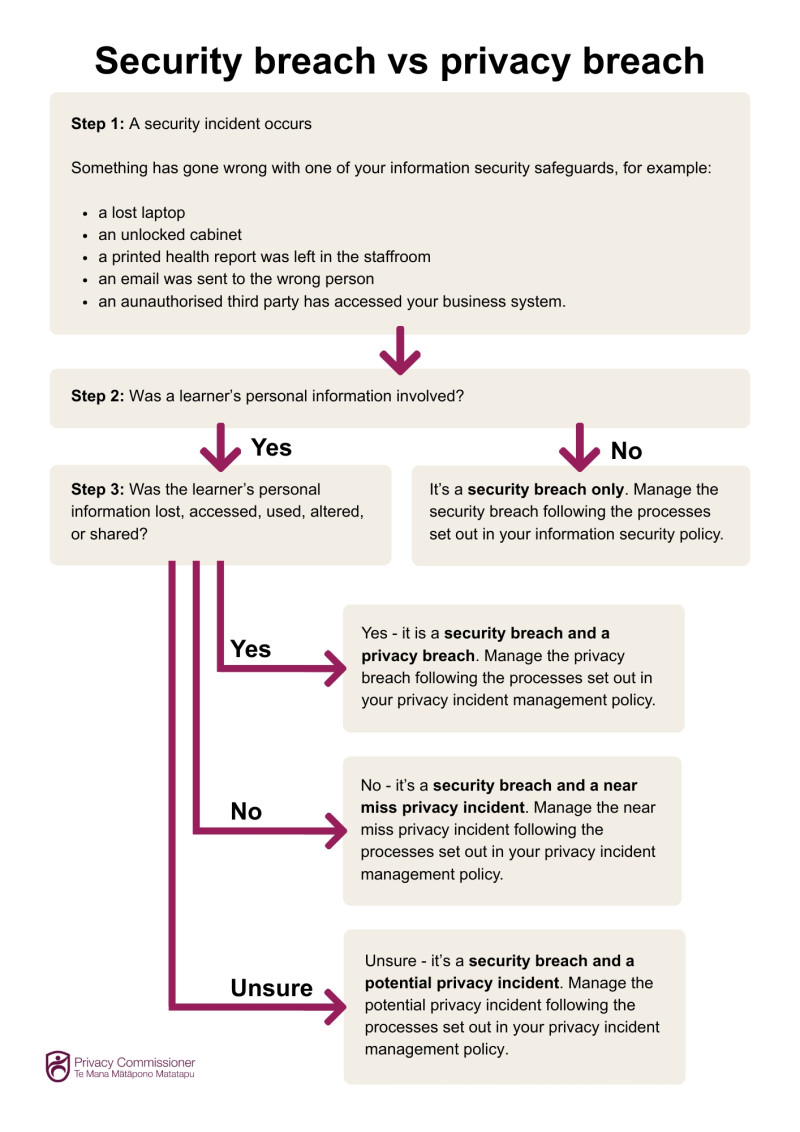
Read more information on privacy breach management in Chapter 15: Privacy Incidents.
Visitor Processes
Robust visitor processes are essential as they help protect the safety of your learners and their information.
Visitors, whether parents, contractors or representatives from external agencies, may unintentionally or deliberately access areas or see and hear information about learners that they shouldn’t.
Security safeguards for visitors include:
- All visitors must sign in at the office.
- All visitors must be issued a visitor pass that is worn at all times while on site.
- Escort visitors if they need to enter a classroom, office or staff only area.
- Challenge anyone without a visitor pass and direct them to the office to complete the sign-in process.
- Check visitors out when they leave site.
Requiring visitor sign-in processes, visible identification and restricted access while on site helps you know who is on site and where they are and reduces the risk of unauthorised access to your learner’s information.
Back to top.

 Keeping learner information safe and secure in practice
This section provides some common examples of keeping information safe and secure in the education sector.
Example: Parent communication platforms
Education providers use parent communication platforms to share progress and achievement information and updates about learners (e.g. photos and videos of classroom activities). Teachers upload learning activity notes, photos and videos regularly, and parents log in to view their child’s progress.
What are some of the security safeguards education providers should have in place to make sure learner information shared in parent communication platforms is kept safe and secure?
Consent management
- Make sure you obtain consent to take photos and videos of your learners for the purpose of posting to the parent communication platform.
- Review and update consent regularly and update the platform to reflect any changes.
Platform security
- Only use approved, secure parent communication platforms.
- Turn on and require use of multi-factor authentication where it is available.
- Use strong, unique passwords and log-in using your unique credentials (do not share log-in credentials or passwords).
- Always log out when you have finished uploading content.
Device use
- Only use approved devices for recording and uploading content - do not use personal devices.
- Devices should be locked when not in use.
Content controls
- Double check that updates and images are loaded to the correct learner profile before posting.
- Avoid posting unnecessary or sensitive learner information (e.g. health or family circumstance information).
- Photos or videos of groups of learners are not posted unless all parents have provided consent.
Access controls
- Remove access for staff who have left or changed roles.
- Remove access for parents whose children’s have left the school or ECE service, or for safety reasons should no longer have access.

Example: Photos and videos used for learning portfolios
An ECE service teacher takes photos and videos of learners during structured learning activities. The photos and videos are used in learning portfolios to evidence learning progress and share updates with parents. Consent has been obtained from the learner’s parents to take photos and videos for these purposes.
What should the teacher do to ensure the photos and videos are kept safe and secure?
To keep the photos and videos safe and secure the teacher should:
- Only use ECE service approved devices to take photos and videos of the learners (personal devices should not be used).
- Make sure photos and videos are uploaded directly to the ECE service’s secure learning management system (e.g. Storypark, Educa) as soon as possible and then securely deleted from the device.
- Make sure photos and videos are uploaded to the correct learner profiles.
- Not print, display, post to public platforms (e.g. social media accounts) or share photos and videos of learners with third parties unless specific consent has been obtained from the learner’s parents for those purposes.
- Make sure any printed copies of photos are securely disposed of (e.g. shredded).
- Make sure old photos and videos that are no longer needed are securely disposed of (do not disposed of old photos in the general rubbish).
Read more about filming and photography of children and young people in our guidance.
Example: Protecting learner information in paper records
A school administrator maintains the schools paper records which include enrolment forms, consent forms, emergency contact information, health information and learning support assessments and reports.
What security safeguards should the school administrator have in place to keep the paper records safe and secure?
The school administrator should ensure:
- they are stored in locked filing cabinets or a secure records room
- a process is in place for approved safe to access/sign-out paper records and that they are returned/signed-in promptly
- sensitive paper records (e.g. records containing health information) are stored separately with restricted access
- when in use, paper records are not left unattended or used in areas where other people may be able to see or access the information
- when paper records need to be moved or copies shared with approved third parties they are placed in a sealed folder or envelop marked ‘confidential’ or “private’
- paper records are not taken off site unless absolutely essential and approved by the school principal
- old or duplicate paper records are securely disposed where permission to dispose of the records has been obtained (e.g. shredders or secure document destruction bins)
- a document disposal register is maintained for accountability purposes.
Example: Protecting learner information at meetings
A learning support team hold a meeting to discuss several learners who need additional support. To help identify appropriate supports, the team needs to access reports, assessments and other information about the learners.
How can the learning support team ensure that the learner’s information is kept safe and secure?
The reports, assessments and other documents contain sensitive information that needs to be protected against loss and unauthorised access, use and disclosure. However, it is also important that learning support team can access and use the information to identify appropriate learning supports for the learners.
To keep the learner's’ information safe and secure before, during and after the meeting, the learning support team should:
Before the meeting
- Book a private meeting room if it is an in-person or hybrid meeting.
- Only invite staff that have a legitimate need to be present.
- Wake sure meeting invites do not contain personal information about the learners.
- If preparatory documents are being sent to meeting participants in advance of the meeting send secure links to the documents where possible.
- In the meeting invite encourage meeting participants not to print copies of the documents.
- Where is it necessary to use paper documents, have one person (e.g. the meeting organiser) print the documents and provide them to meeting participants at the meeting.
During the meeting
- Maintain confidentiality – discussions should be restricted to the purpose(s) of the meeting and should not be overheard by unauthorised people.
- Don’t use unapproved digital technology to record the meeting or create transcripts of the meeting.
- If there is a break in the meeting, make sure computers and display devices are locked and the meeting room is secured.
After the meeting
- Collect all paper copies of documents and make sure they are returned to a locked filing cabinet or securely disposed of (e.g. shredded or put in secure document destruction bins).
- Save meeting minutes in the schools secure document management system with appropriate access restrictions.
- Don’t email meeting minutes to meeting participants – send them a link to the meeting minutes instead.
Read more guidance on sharing learner information at multi-agency meetings in Chapter 7: Sharing Information.
Example: Using a third party to provide a service
A school principal wants to procure a new case management system to manage learning support information. The system will be provided and maintained by a third-party vendor.
What should the principal do to ensure the learning support information held in the case management system is kept safe and secure?
The school principal must make sure they do everything reasonably within their power to prevent unauthorised access, use and disclosure of learner information where it is necessary for that information to be given to a person in connection with the provision of a service to the school. While the third-party vendor is providing and maintaining the case management system, the school board is accountable for making sure the learner information is kept safe and secure.
The school principal should:
- Do due diligence before purchasing the case management system including assessing the third-party vendor’s privacy policy and security standards comply with the Privacy Act.
- If the case management system is cloud based, confirm where the information will be stored (New Zealand or offshore), and determine whether overseas storage is appropriate for the data and information that will be held in the case management system (e.g. for Māori data or sensitive information).
- Identify whether the case management system offers security enhancing features such as role-based access, encryption, secure logins, multifactor authentication and audit functionality.
- Make sure the contract with the third-party vendor contains adequate data protection clauses and put in place service level agreements for system availability, backups and security maintenance and response times.
- Utilise role-based access controls to ensure only authorised staff can access the case management system.
- Require the use of strong, unique passwords and that staff log into the case management system using their own credentials.
- Make sure user accounts are removed promptly when staff leave or change roles.
- Conduct regular reviews of access and use of the case management system, access permissions and audit logs.
- When the contract expires or the case management system is no longer required, require the third-party vendor to provide a complete export of all information held in the case management system (in a useable format) and seek confirmation that the third-party vendor has permanently deleted all learner information from its servers.
Example: Protecting a learner’s health information
A year 6 learner has a severe peanut allergy. The learner’s parents have provided the school principal with a detailed allergy management plan, including medication requirements.
What should the school principal do to keep this information safe and secure?
The allergy management plan contains sensitive health information that needs to be protected against loss and unauthorised access, use and disclosure. However, it is also important that relevant staff know about the plan so that they can assist the learner appropriately if required.
To keep the learner’s allergy management plan safe and secure, the school principal should:
- Store the paper version of the allergy plan in a secure filing cabinet in a restricted access area (e.g. the principal’s office) or create a digital copy of the allergy plan and file it in a business system with appropriate role-based access (returning the original to the learner’s parents).
- Enable access to the digital allergy plan for teachers and staff who require access to the allergy plan to help keep the learner safe.
- When relief staff are working with the learner make sure relevant information about the allergy plan is shared with them (e.g. via a verbal briefing or controlled access to the allergy plan).
- Share key information with other staff in need-to-know format without sharing or providing access to the learner’s full allergy management plan (e.g. the learner has a severe peanut allergy, epi-pen and instructions for use are stored in the teacher’s cupboard in the classroom).
- When the learner leaves the school ensure that the information is only retained for the statutory period and then is securely deleted (e.g. shredded or placed into a secure document destruction bin).
Read more information about health and learning support information in Chapter 9: Health and learning support information.
Read more information on retention and disposal of information in Chapter 12: Retention and disposal of information.
Back to top.
Checklist: Keeping learner information safe and secure
Use this checklist to help you keep learner information safe and secure.
Download a printable PDF version of this checklist (PDF, 204 KB).
|
Lock it up – Keep paper files, notebooks, and tests and assessments in secure drawers or cupboards.
|
|
Use approved systems, tools and apps – Only use systems, tools and apps that have been approved for use.
|
|
Access to systems – Only access systems, tools and apps that you have been approved to use.
|
|
Log in – Use your own credentials to log in to approved systems, tools and apps.
|
|
Password care – Use strong, unique passwords and never share them and use multifactor authentication where possible.
|
|
Log out and off – Always log out of systems, tools and apps and log off computers or devices when not in use.
|
|
Think before you send – Double-check recipient details before emailing learner information, use delay send function where available.
|
|
Store securely – Store learner information in approved systems (avoid personal or external storage devices).
|
|
Dispose properly – Shred or securely delete old documents (put identifiable information in secure disposal bins), delete digital records when they are no longer required.
|
|
Report issues – Let someone know if you lose a device, lose learner information, have sent learner information to the wrong person, or suspect a breach of IPP5 has occurred.
|